QUICKSURFACE
The Complete Reverse Engineering Solution

From 3D Scan to CAD in Minutes
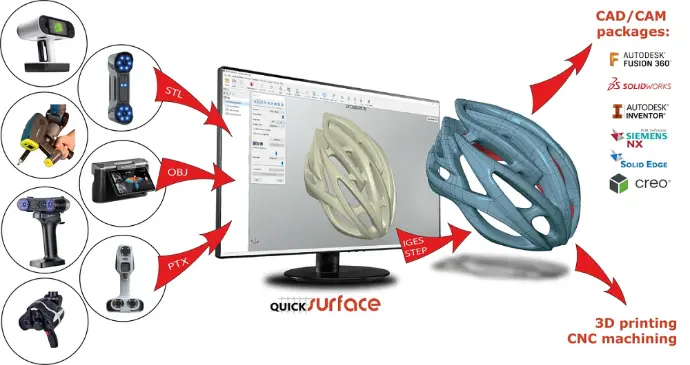
QUICKSURFACE is a powerful and intuitive reverse engineering software designed to convert 3D scan data into precise, editable CAD models.
Whether you’re using a handheld scanner, CMM, or optical device, QUICKSURFACE provides all the tools to transform polygonal meshes into solid, parametric, or surface-based CAD geometry — ready for manufacturing or design optimization.

Key Features
Hybrid Modeling Environment: Combine freeform surfaces and parametric geometry for ultimate flexibility.
Automatic & Manual Surfacing Tools: Create NURBS patches or fitted analytic shapes directly on scan data.
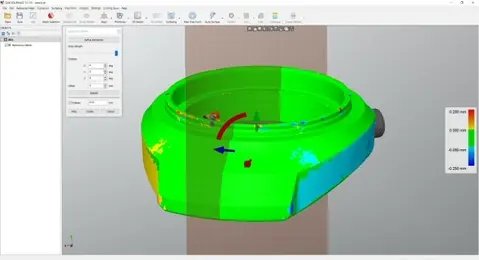
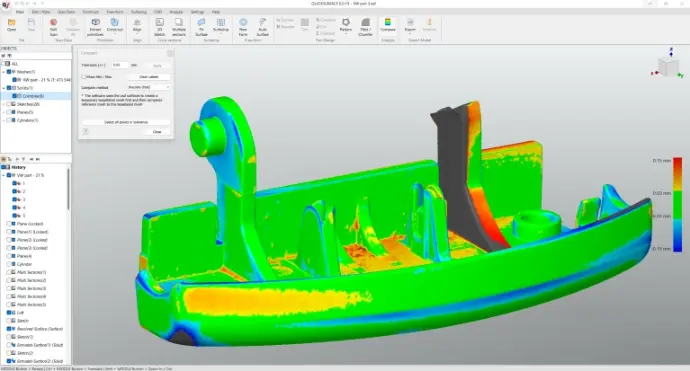
Real-Time Deviation Analysis: Instantly visualize and control accuracy between the CAD model and the original mesh.
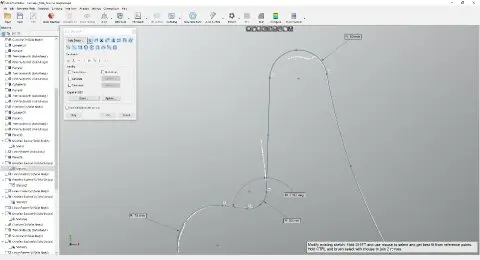
Constraint-Based Design: Define references, symmetry planes, and alignment for high-precision modeling.
Seamless CAD Export: Export fully editable models to SolidWorks, Rhino, Siemens NX, Creo, or STEP/IGES formats.
Intuitive User Interface: Designed for engineers and designers — no steep learning curve, no complex setup.
Advanced Capabilities
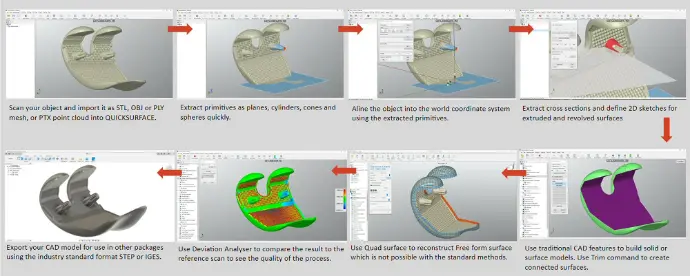
Direct Scan-to-CAD Workflow: Import data from any 3D scanner and start modeling immediately.
Freeform Surface Modeling: Ideal for organic or complex shapes like castings, ergonomic parts, or art objects.
Parametric Modeling: Maintain full control of dimensions and relationships for mechanical parts.
Powerful Mesh Tools: Clean, smooth, and repair scan data to ensure optimal results before surface reconstruction.
Ideal For
Product redesign and engineering updates
Quality control and deviation analysis
Tooling, mold, and die reconstruction
Additive manufacturing and 3D printing workflows
Restoring legacy components without existing CAD files
Why Choose QUICKSURFACE?
Complete Solution: From mesh to CAD, all in one environment.
User-Friendly Interface: Designed for fast learning and high productivity.
Compatible with All Scanners: Works with data from any 3D scanning system.
Seamless CAD Integration: Export directly to the CAD software you already use.
Affordable Professional Tool: High-end results at a competitive price point.
Reverse Engineering Made Simple
With QUICKSURFACE, you can rebuild precise 3D models from scan data quickly, accurately, and efficiently.
Experience the perfect balance between speed, control, and precision — and bring your 3D scanning projects to life.
Workflow: Designing custom insert | QUICKSURFACE
In this video, we walk you through the complete workflow of designing custom insert for steering wheel. The practice STL mesh can be downloaded from this location: www.quicksurface.com/samples/bmw_steering_wheel.zip Watch as we demonstrate how to:
- Import and clean 3D scan data
- Use parametric and freeform tools to rebuild geometry
-️ Combine surfaces and solids into a hybrid model
-️ Export the final design to your preferred CAD software Whether you're new to reverse engineering or looking to refine your workflow, this video gives you a step-by-step look at how QUICKSURFACE makes the process fast, intuitive, and powerful.
Workflow: Custom Engine Mount Design for Individual Engine Swap with QUICKSURFACE for SOLIDWORKS
In this video, we walk you through the process of designing a custom engine mount/bracket for a unique engine swap project. Using the QUICKSURFACE plugin for SOLIDWORKS, we work with 3D scans of the engine block and chassis mounting points to create an accurate sheet metal 3D model — ready to be sent for manufacturing. Whether you're swapping in a completely different engine or fabricating custom mounts from scratch, this workflow ensures precision fitment and saves valuable time during your build. What you’ll see in this video:
- 3D mesh processing in QUICKSURFACE
- Converting scan data into editable CAD geometry
- Designing a custom engine bracket in SolidWorks
This video gives you a step-by-step look at how QUICKSURFACE plug in for SOLIDWORKS makes the process fast, intuitive, and powerful.
Workflow: Compare scan data with CAD with QUICKSURFACE
In this video, we walk you through the workflow of how to import a scan data and a cad file, align them and create a colour plot Watch as we demonstrate how to: ✔️ Import and clean 3D scan data ✔️ Use parametric and freeform tools to rebuild geometry ✔️ Combine surfaces and solids into a hybrid model ✔️ Export the final design to your preferred CAD software Whether you're new to reverse engineering or looking to refine your workflow, this video gives you a step-by-step look at how QUICKSURFACE makes the process fast, intuitive, and powerful.